

The Rise of AI Printers: Why Small Businesses Need to Pay Attention
For a long time, printers were…well, just printers. They took a file and put ink on paper. But that’s changing. Artificial intelligence is no longer a futuristic concept; it’s starting to show up in everyday office equipment, and that includes printers. This isn’t about robots delivering paper, but about smarter features designed to streamline workflows and reduce headaches for small businesses.
Traditional printers often fall short in several areas that are particularly painful for smaller operations. Think about wasted paper from incorrect settings, security vulnerabilities, or the time spent troubleshooting jams and connectivity issues. These problems might seem minor individually, but they add up. AI aims to address these challenges directly, offering solutions that were previously unavailable.
The demands on small business printing are also evolving. Remote work means more distributed printing needs, and increased cybersecurity threats require stronger protection of sensitive documents. Small businesses need to do more with less, and that’s where AI-powered features like automatic optimization and predictive maintenance come into play. It's about working smarter, not harder.
I’m not entirely convinced that every small business needs an AI printer right now. The benefits are most pronounced for companies with higher print volumes or complex workflows. However, the trend is undeniable, and the price of these technologies will likely come down, making them more accessible to a wider range of businesses.
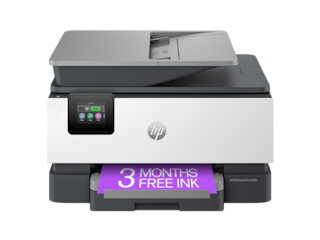
HP AI Printing: A Deep Dive into Smart Features
HP leads the market in AI integration. Their HP AI Print initiative, detailed on hp.com, changes how the hardware operates rather than just adding a software label. I've watched their 'Meet HP AI Print' demonstrations, and the focus is on efficiency over novelty.
One key feature is automatic content optimization. The printer analyzes the document being printed – text, images, graphics – and adjusts settings to deliver the best possible quality while minimizing ink or toner usage. This goes beyond simple print quality settings; the AI actively learns and adapts to different content types. HP is also emphasizing smart task workflows, allowing users to quickly and easily perform common printing tasks with minimal effort.
Security is another area where HP is leveraging AI. They’ve discussed using AI to detect and prevent potential security threats, such as unauthorized access to the printer or malicious software. This is particularly important for small businesses that may not have dedicated IT security staff. However, the specifics of these security enhancements are still somewhat vague.
But what doesn’t HP AI Print do? As of late 2026, it doesn’t fully automate document creation or design. It excels at optimizing and securing the printing process itself, but it doesn't replace the need for design software or content management systems. It’s an enhancement to existing workflows, not a complete replacement.
Beyond HP: Other AI-Powered Printer Options for 2026
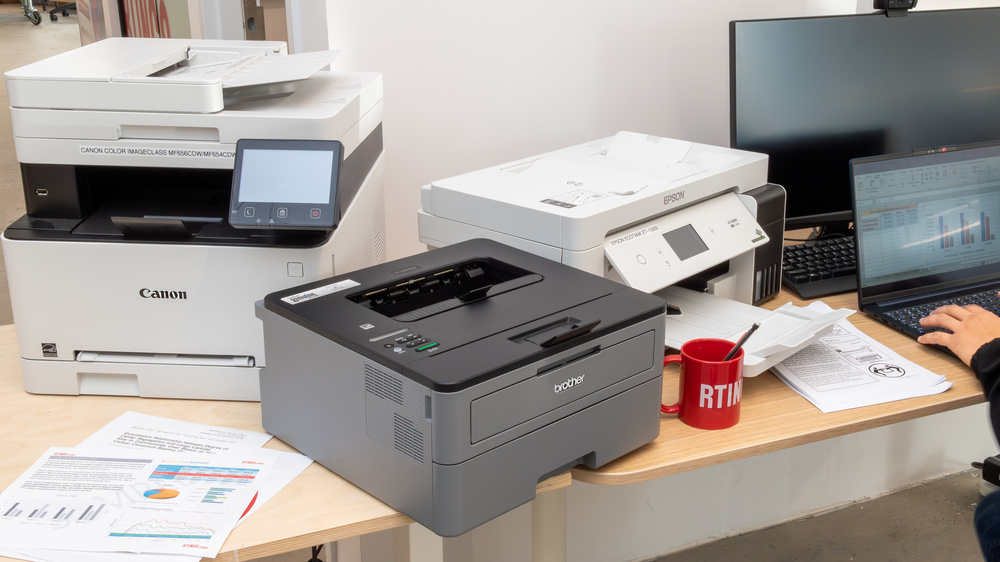
While HP is currently the most visible player in the AI printer space, other manufacturers are starting to explore similar technologies. Epson, Brother, and Canon haven’t made the same level of public commitment to AI integration as HP, but it’s reasonable to expect them to follow suit in the coming years. They’re all investing heavily in R&D, and AI is likely to be a key focus.
Epson, for example, is known for its precision printing technology, which could be enhanced with AI-powered color management and image optimization. Brother, with its strong focus on small business solutions, might integrate AI into its print management software to provide more granular control over printing costs and security. Canon, a leader in imaging technology, could leverage AI to improve document scanning and OCR (Optical Character Recognition) capabilities.
Third-party solutions like PaperCut’s Print AI (papercut.com) also work for existing hardware. PaperCut doesn’t manufacture printers, but their AI-powered software can be integrated with a wide range of printer brands to provide advanced features like print security, usage monitoring, and cost control. This allows businesses to add AI capabilities to their existing printers without having to invest in new hardware.
I'm not sure if manufacturers will open their systems, but I expect more collaboration with software developers by 2026. We’ll likely see more open platforms that allow businesses to customize their printing workflows with AI-powered tools.
AI-Powered Wireless Printers for Small Business – Projected 2026 Comparison
| Brand | AI-Powered Task Automation | AI-Powered Security | Smart Setup/Troubleshooting | Relative Cost |
|---|---|---|---|---|
| HP | High - HP is actively integrating AI to streamline printing workflows and optimize print jobs. Current initiatives suggest expansion into predictive maintenance and automated supply ordering. | Medium - AI-enhanced security features are present, focusing on threat detection and data protection, with anticipated improvements in anomaly detection by 2026. | High - HP’s current AI features support smart setup and troubleshooting, with projected expansion into more proactive issue resolution and self-healing capabilities. | Medium to High |
| Epson | Medium - Epson is exploring AI for print quality optimization and workflow automation. Future developments may include intelligent document analysis. | Medium - AI-driven security features are emerging, with a focus on access control and data encryption. Expansion is expected in threat prevention. | Medium - Current Epson printers offer simplified setup, and AI is expected to enhance troubleshooting through predictive diagnostics. | Medium |
| Brother | Low to Medium - Brother is beginning to incorporate AI for basic task automation, such as intelligent image processing. Further expansion is anticipated. | Low - AI-powered security features are currently limited, but Brother is likely to integrate more advanced threat detection systems by 2026. | Medium - Brother printers generally offer straightforward setup, and AI could improve troubleshooting by identifying common issues. | Low to Medium |
| Canon | Medium - Canon is utilizing AI for image enhancement and workflow optimization. Future AI integration may focus on personalized printing experiences. | Medium - Canon is implementing AI-based security features, including intrusion detection and access control. Further advancements are expected. | Medium - Canon’s printers provide relatively easy setup, and AI is projected to assist with troubleshooting through automated diagnostics. | Medium to High |
Illustrative comparison based on the article research brief. Verify current pricing, limits, and product details in the official docs before relying on it.
Smart Setup & Wireless Connectivity: A Must-Have for Busy Businesses
AI features are fantastic, but they’re useless if the printer is a pain to set up and use. Wireless connectivity is now a standard expectation, and the latest Wi-Fi 6E standard offers faster speeds and improved reliability. Bluetooth connectivity is also becoming increasingly common, allowing for direct printing from mobile devices. But it’s not just about the wireless technology itself; it’s about the setup process.
Many modern printers offer simplified setup processes through mobile apps. These apps guide users through the network configuration, driver installation, and other essential steps. HP Smart, for example, is known for its user-friendly interface and automatic printer detection. Brother and Epson also offer similar apps that streamline the setup process. I've found that some brands still require a bit of technical know-how, but the trend is towards easier setup.
Voice assistant integration is another convenience feature. Some printers allow you to print directly from your voice assistant (like Amazon Alexa or Google Assistant) using simple voice commands. This can be particularly useful for quick print jobs, like printing a boarding pass or a shopping list. It's a small feature, but it adds to the overall convenience.
A common pain point for small business owners is initial network configuration. The best printers use automatic network detection so you don't have to configure them manually. Look for printers that support Wi-Fi Protected Setup (WPS) or offer a dedicated mobile app for network configuration.
- Check for Wi-Fi 6E support for faster and more reliable wireless connectivity.
- Look for mobile apps that simplify the setup process.
- Consider voice assistant integration for added convenience.
- Ensure the printer supports automatic network detection and simplified Wi-Fi setup.
Cost Savings with AI: Beyond the Initial Price Tag
The purchase price of an AI-powered printer is important, but it’s only one piece of the puzzle. The total cost of ownership – including consumables (toner/ink), maintenance, and energy consumption – is what really matters. AI features can contribute to significant cost savings over the long term.
Automatic duplex printing is a simple yet effective way to reduce paper consumption. AI can help ensure that duplex printing is enabled by default and automatically applied to appropriate documents. Toner or ink optimization is another area where AI can make a difference. The printer can adjust print settings to use less toner/ink without sacrificing quality. Predictive maintenance features can help prevent costly breakdowns by identifying potential issues before they occur.
Print job routing is a more advanced feature that allows you to direct print jobs to the most appropriate printer based on factors like paper type, color requirements, and security settings. This can help reduce waste and optimize printing costs. Usage monitoring features provide insights into printing patterns, allowing you to identify and eliminate wasteful printing habits.
ng can be difficult, but a small business printing 500 pages per month could potentially save $50-$100 per year on paper and toner costs through automatic duplex printing and toner optimization. Predictive maintenance could prevent a costly printer repair, saving hundreds of dollars. While these are estimates, the potential savings are significant.
Printer Manufacturing Stocks: Market Performance Analysis
Stock prices and performance metrics for major printer and imaging companies (December 2024)
| Asset | Current Price | 24h | 7d | 30d | Market Cap |
|---|---|---|---|---|---|
| HP Inc. HPQ | $37.42 | +0.8% | +2.1% | +5.3% | $36.8B |
| Canon Inc. CAJ | $24.15 | -0.3% | +1.2% | +3.7% | $25.4B |
| Seiko Epson Corporation SEKEY | $7.89 | +0.5% | -0.8% | +2.1% | $2.8B |
| Xerox Holdings Corporation XRX | $9.23 | -1.2% | -2.8% | -4.5% | $1.1B |
| Ricoh Company Ltd. RICOY | $6.45 | +0.2% | +0.9% | +1.8% | $4.6B |
| Brother Industries Ltd. BRTHY | $12.67 | +0.7% | +1.5% | +4.2% | $3.2B |
Analysis Summary
HP Inc. leads the sector with the highest market capitalization at $36.8B, while traditional players like Canon maintain strong positions. Xerox shows recent weakness with negative monthly performance, reflecting ongoing business transformation challenges.
Key Insights
- HP Inc. dominates market cap among pure-play printer manufacturers, benefiting from diversified printing and PC portfolio
- Canon maintains premium valuation despite competitive pressures, supported by imaging technology leadership
- Xerox faces headwinds with -4.5% monthly decline as the company navigates digital transformation challenges
- Japanese manufacturers (Epson, Ricoh, Brother) show modest but stable growth amid AI-powered printer innovation trends
Stock prices reflect recent market data for publicly traded printer and imaging companies. Total cost of ownership for AI-powered vs. basic wireless printers varies significantly based on print volume, with AI features potentially reducing long-term costs through predictive maintenance and optimized consumables usage over a 3-year period.
Disclaimer: Stock prices are highly volatile and subject to market fluctuations. Data is for informational purposes only and should not be considered investment advice. Always do your own research before making investment decisions.
Security Considerations: Protecting Your Business Data
Printers are often overlooked as a security risk, but they can be a vulnerable point in your network. AI-powered printers offer several security features designed to protect sensitive business data. User authentication is a basic but essential security measure, requiring users to enter a PIN or use a badge to access the printer.
Data encryption ensures that sensitive documents are protected both in transit and at rest. Intrusion detection systems can identify and block unauthorized access attempts. Some printers also offer features like secure print release, which requires users to physically retrieve their print jobs before they are printed.
PaperCut’s Print AI addresses print security concerns by providing features like print logging, audit trails, and secure print release. It can also integrate with existing security systems to provide a comprehensive security solution. This is particularly important for businesses that handle confidential information, such as financial data or customer records.
I think the biggest security benefit of AI lies in its ability to proactively detect and respond to threats. AI-powered printers can learn from past attacks and adapt their security measures accordingly, providing a more robust defense against evolving cyber threats.
Top AI-Powered Wireless Printers (2026)
- HP OfficeJet Pro 9600 All-in-One - HP’s Smart Security features, bolstered by AI, proactively detect and neutralize threats. Offers robust wireless connectivity and automatic software updates for enhanced protection. Supports automatic threat detection and remediation.
- Brother MFC-L3770CDW Digital Color Multifunction Printer - Brother’s security suite, increasingly leveraging AI, provides intrusion detection and secure print release. Wireless connectivity simplifies setup, and the color printing capability is ideal for marketing materials. Features secure function lock to control access.
- Canon imageCLASS ThruPut 2650i - Canon’s Universal Login Manager (ULM) and AI-enhanced anomaly detection help secure print jobs and user access. Wireless printing and mobile device support streamline workflows. Canon also emphasizes firmware updates to address vulnerabilities.
- Lexmark CS725de Color Laser Printer - Lexmark’s Print Release feature, combined with AI-driven user authentication, ensures confidential documents are only printed for authorized personnel. Wireless capabilities and a user-friendly interface are key benefits. Lexmark focuses on full-spectrum security.
- Epson EcoTank Pro ET-5850 Wireless Wide-Format Color All-in-One Printer - Epson's IT Admin Portal, combined with AI-driven monitoring, provides insights into printer usage and potential security risks. The EcoTank system reduces printing costs, and wireless connectivity offers flexibility. Epson emphasizes secure firmware updates.
- Ricoh IM C300 - Ricoh’s All-in-One device utilizes AI to detect and prevent unauthorized access, bolstering document security. Wireless connectivity and mobile printing support enhance productivity. Ricoh focuses on proactive threat management with its security features.
Troubleshooting & Support: How AI Can Help When Things Go Wrong
Even the most reliable printers experience issues from time to time. AI-powered printers offer improved troubleshooting and support features to help resolve common printing problems quickly and efficiently. Automatic error detection can identify and diagnose printer issues, providing users with clear and concise error messages.
Remote diagnostics allow technicians to remotely access the printer and diagnose problems without having to physically visit the site. This can significantly reduce downtime and repair costs. AI-powered chatbots can provide instant support for common printing issues, guiding users through troubleshooting steps or connecting them with a live support agent.
Many manufacturers are also using AI to proactively prevent issues before they occur. Predictive maintenance features can analyze printer data to identify potential problems and schedule maintenance before they lead to a breakdown. This can extend the life of the printer and reduce the risk of unexpected downtime.
Online resources and support forums are also invaluable tools for troubleshooting printer issues. Many manufacturers offer extensive online documentation, FAQs, and troubleshooting guides. Active online communities can provide peer-to-peer support and access to expert advice.
Future Trends: What's Next for AI and Wireless Printing?
The integration of AI and wireless printing is still in its early stages, and the future holds exciting possibilities. I anticipate seeing more sophisticated AI features, such as predictive toner/ink ordering, where the printer automatically orders replacements when supplies are running low. Personalized printing experiences, tailored to individual user preferences, are also likely to become more common.
Integration with other smart office devices is another trend to watch. Imagine a printer that automatically adjusts its settings based on the type of document being printed from your laptop or smartphone. Or a printer that seamlessly integrates with your cloud storage services, allowing you to print directly from anywhere. The possibilities are endless.
However, there are also ethical implications to consider. Data privacy is a major concern, as AI-powered printers collect data about printing habits. It’s important to ensure that this data is handled securely and responsibly. Job displacement is another potential issue, as AI-powered automation could reduce the need for some printing-related jobs.
I’m excited to see how this technology evolves, but it’s important to approach it with a balanced perspective. AI has the potential to revolutionize the printing industry, but it’s not a silver bullet. Careful planning and consideration are essential to ensure that AI is used responsibly and effectively. The next few years will be crucial in shaping the future of AI and wireless printing.
If you don’t have a local print shop, I recommend small business printers! They’re more likely to be mindful about wasting materials. @WildePrints is my recommendation for stickers, they do what they can to reduce wasting vinyl when printing 🤍 pic.twitter.com/fYk5EixC0J
— starsleeps (@starsleeps) November 10, 2024
No comments yet. Be the first to share your thoughts!