

Are color lasers still worth it?
In 2026, the question isn’t if a small business needs to print, but how. While all-in-one inkjet printers have become incredibly versatile, color laser printers maintain a strong position, particularly for businesses with consistent printing needs. They simply offer a different set of strengths. Laser printers excel at speed and cost per page, and their prints are less prone to smudging or fading than inkjet, making them ideal for documents that need to last.
For many smaller operations, the initial cost of a laser printer has been a barrier. However, the price has come down, and there are now genuinely affordable color laser printers available. This guide focuses on options under $300, recognizing that this price point requires some compromise. We’ll look at what you can realistically expect for your money and which models deliver the best value.
This guide isn’t intended for businesses with extremely high-volume printing requirements, or those needing highly specialized features like wide-format printing. It’s aimed at the typical small business – a handful of employees, a need for professional-looking documents, and a desire to keep printing costs under control. If you fall into that category, a budget-friendly color laser printer could be a smart investment.
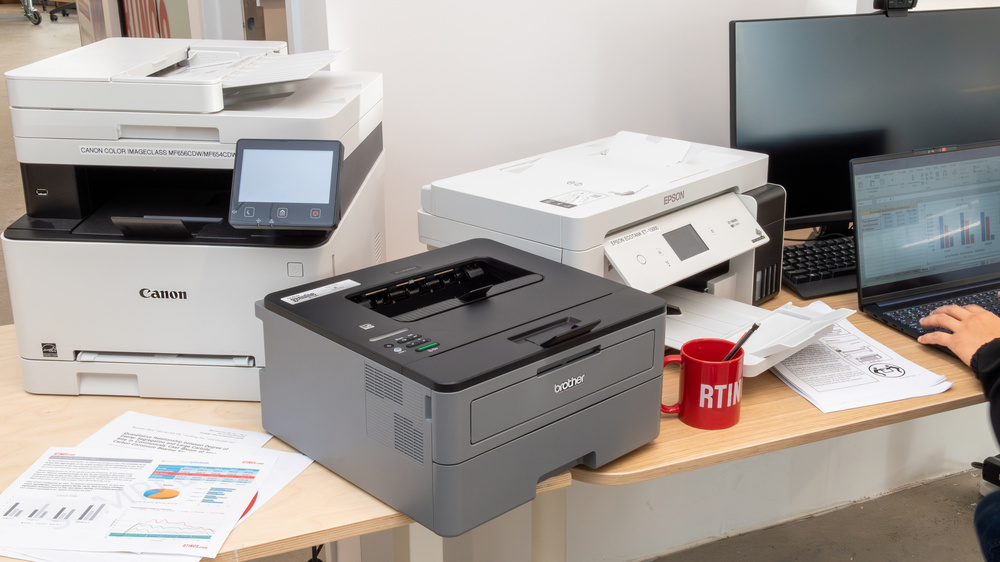
What $300 actually buys you
Let's be upfront: $300 doesn't buy you the top of the line. In 2026, you'll likely encounter trade-offs when shopping for affordable color laser printers in this price range. Expect slower print speeds – around 18 to 21 pages per minute is typical – and potentially lower paper capacity compared to more expensive models.
Feature sets will also be more limited. Automatic duplexing (printing on both sides of the paper) isn’t always standard at this price point, though some models do include it. Similarly, advanced features like touch screen controls or extensive networking options might be absent. The "color’ aspect is also important to understand; while these printers produce color, don’t expect professional-grade photographic quality. They"re perfectly adequate for documents, presentations, and basic marketing materials, but not for high-resolution photo prints.
Prices are constantly fluctuating, so the exact models available and their prices will vary. The prices I mention are based on current trends as of late 2024 and early 2025, and are subject to change. Keep that in mind as you shop.
Top Picks: Color Lasers Under $300 (2026)
Finding the right balance of features and price requires careful consideration. Here are a few color laser printers that consistently appear on "best of" lists and fall within the $300 budget as of late 2025. Availability will vary, so check Best Buy and Amazon for current pricing and stock.
HP Color LaserJet MFP 178nw: This is a popular all-in-one option, offering printing, scanning, and copying in a compact footprint. It boasts print speeds of up to 18 pages per minute in both black and color, and offers wireless connectivity. A key advantage is HP’s Smart App, which simplifies setup and mobile printing. However, the paper capacity is relatively low at 250 sheets. Current price: around $229.
Brother HL-L3270CDW: Brother consistently delivers reliable printers, and the HL-L3270CDW is no exception. It’s a color laser printer with a focus on speed and efficiency, printing up to 25 pages per minute. It also includes built-in Wi-Fi and mobile printing support. One drawback is the lack of automatic duplexing. Current price: around $250.
Canon imageCLASS Color MF634CDW: Canon is another trusted name in printing. This model is a color laser all-in-one that provides printing, scanning, copying, and faxing capabilities. It offers a respectable print speed of 18 ppm and features a user-friendly 5-inch touchscreen. While a bit closer to the $300 mark, the added features might justify the cost for some businesses. Current price: around $299.
Lexmark CS310dn: Lexmark often flies under the radar, but they produce solid machines. The CS310dn is a color laser printer focused on straightforward printing. It’s a bit more basic than some of the other options, lacking some of the advanced features, but it’s a dependable workhorse. It prints at 25 pages per minute and has a decent paper capacity. Current price: around $199.
Featured Products

Wireless and Ethernet connectivity · Automatic duplex (two-sided) printing · Mobile printing capabilities
This Brother printer is a solid choice for small businesses needing reliable color laser printing with convenient wireless and mobile options, all in a compact form factor.
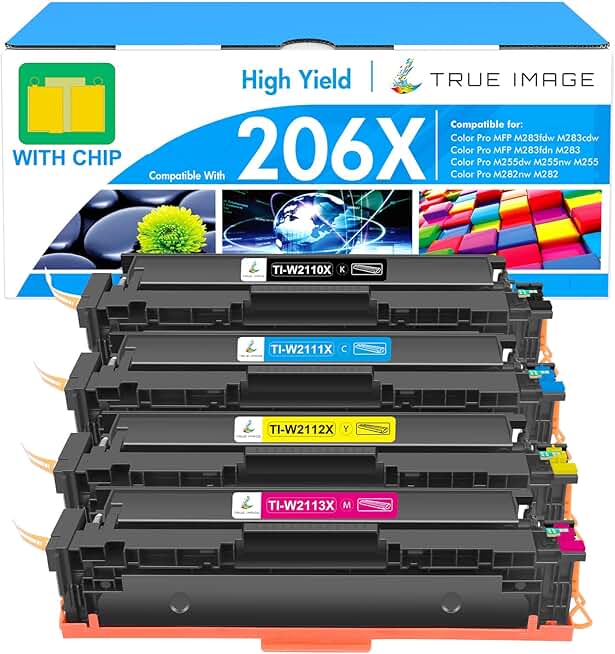
High-yield toner cartridges · Compatible with specific HP Color LaserJet Pro models · Includes black, cyan, magenta, and yellow cartridges
These high-yield toner cartridges offer a cost-effective way to keep your compatible HP color laser printer running, ensuring you have all necessary colors for continuous printing.

All-in-One functionality (print, copy, scan, fax) · Wireless and NFC connectivity · Automatic duplex printing
The Canon imageCLASS MF743Cdw is a feature-rich all-in-one laser printer that provides robust connectivity and the peace of mind of a long warranty, suitable for busy small offices.

Print speeds up to 26 ppm (mono and color) · Automatic duplex printing · Wireless LAN connectivity
The Lexmark CX331adwe delivers fast color printing with automatic duplexing and wireless capabilities in an energy-efficient package, making it a practical choice for small business needs.
As an Amazon Associate I earn from qualifying purchases. Prices may vary.
Connectivity & Ease of Setup
For a small business, convenience is key. That’s why wireless connectivity is so important. All of the printers listed above offer Wi-Fi, and many also support Wi-Fi Direct, allowing you to connect directly to the printer without needing a router. Ethernet and USB connections are also typically available for wired connections.
Setup has become significantly easier in recent years. Most printers now include intuitive setup wizards and companion apps for smartphones and tablets. The HP Smart App, for example, simplifies the entire process, guiding you through connecting to your network and installing drivers. Brother and Canon also offer similar apps.
Mobile printing is standard now. These models support AirPrint and Mopria, so you can print from a phone without installing drivers. The Canon MF634CDW is the easiest to use here because the touchscreen lets you handle network settings without a PC.
Toner costs and maintenance
The initial printer price is only part of the equation. Running costs, particularly toner, can significantly impact your overall expenses. Toner cartridges can be surprisingly expensive, so it’s important to factor this into your budget.
Standard yield cartridges generally cost less upfront, but need to be replaced more frequently. High yield cartridges are more expensive initially, but offer a lower cost per page in the long run. For example, a standard yield toner cartridge for the HP Color LaserJet MFP 178nw might cost $80 and yield around 700 pages, while a high yield cartridge costs $120 and yields around 2,800 pages. Doing the math, the high yield cartridge works out to be significantly cheaper per page.
Beyond toner, consider the cost of replacement parts like drums and fusers. These components don’t need to be replaced as often as toner, but they can be expensive when they do need replacing. Check the manufacturer’s website for estimated replacement intervals and costs. Energy efficiency is also worth considering; some printers consume more power than others, which can add up over time.
Troubleshooting Common Issues
Even the most reliable printers experience occasional problems. Paper jams are a common issue. Always check for any torn or misaligned paper, and carefully remove it following the printer’s instructions. Poor print quality can often be resolved by cleaning the print heads or adjusting the print settings.
Connectivity issues can be frustrating. Make sure the printer is properly connected to your network and that the drivers are up to date. Restarting the printer and your computer can often resolve temporary glitches. Error messages can provide clues about the problem; consult the printer’s manual or the manufacturer’s website for explanations and solutions.
If you run into deeper hardware issues, check the support pages for HP, Brother, Canon, or Lexmark for specific error code lookups.
Eco-Friendly Printing & Saving Money
Reducing your environmental impact and saving money often go hand in hand. Printing double-sided (duplex printing) can cut your paper consumption in half. Using draft mode reduces toner usage, although it may result in lower print quality. Recycling toner cartridges is another important step; many manufacturers offer recycling programs.
Choosing an energy-efficient printer can also help lower your carbon footprint and reduce your electricity bill. Look for printers with Energy Star certification. The Brother HL-L3270CDW, for example, is Energy Star qualified. Consider carefully before printing; ask yourself if a digital alternative would suffice.
No comments yet. Be the first to share your thoughts!