
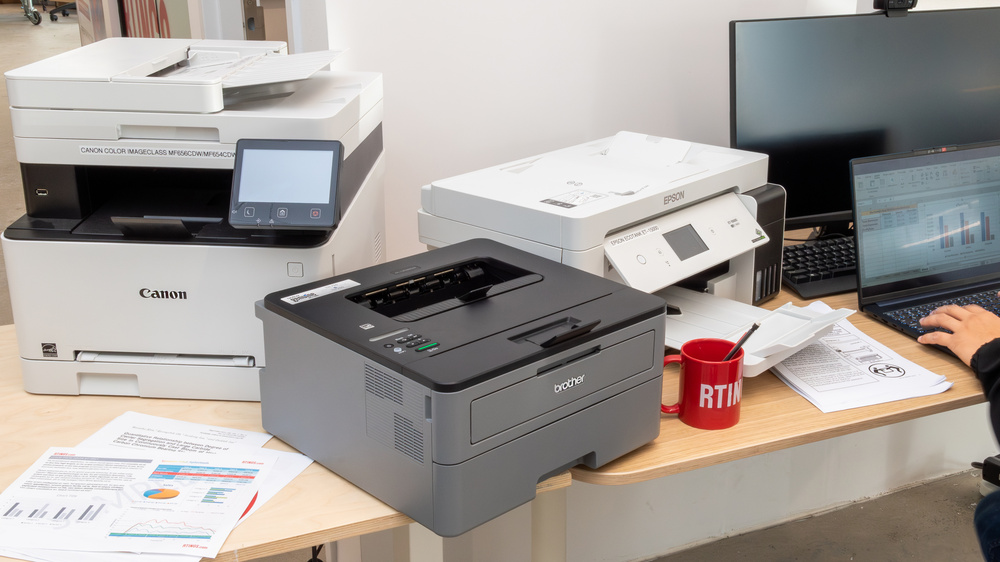

Understanding Your Small Business Printing Needs in 2024
Selecting the right affordable color laser printer for your small business requires careful consideration of your specific requirements, budget constraints, and long-term operational costs. Color laser printers have become increasingly accessible to small businesses, offering professional-quality output that was once reserved for larger enterprises with substantial printing budgets.
The landscape of small business printers has evolved significantly in 2024, with manufacturers focusing on delivering cost-effective solutions that don't compromise on quality or essential features. Modern affordable color laser printers now include advanced connectivity options, enhanced security features, and improved energy efficiency, making them ideal investments for growing businesses.
Key Factors to Consider Before Making Your Purchase
When evaluating affordable color laser printers for your small business, several critical factors will determine which model best serves your operational needs and budget requirements.
Print Volume and Speed Requirements: Small businesses typically require printers capable of handling 500 to 3,000 pages per month. Consider your current printing volume and anticipated growth when selecting a model. Print speeds ranging from 20 to 30 pages per minute are generally sufficient for most small business environments, ensuring minimal workflow disruption during busy periods.
Total Cost of Ownership: The initial purchase price represents only a portion of your printer's lifetime cost. Toner cartridge prices, maintenance requirements, and energy consumption significantly impact your long-term expenses. High-yield toner cartridges, while more expensive upfront, often provide better value for businesses with consistent printing needs.
2024 Market Overview: What's Changed
The 2024 printer market has introduced several improvements that benefit small business owners seeking affordable color laser solutions. Manufacturers have enhanced wireless connectivity reliability, implemented stronger security protocols, and improved mobile printing capabilities to accommodate increasingly flexible work environments.
Supply chain stabilization has also contributed to more competitive pricing across leading brands, making quality color laser printers more accessible to budget-conscious small businesses. Additionally, environmental considerations have driven innovations in energy-efficient designs and sustainable toner cartridge programs.
Best Affordable Color Laser Printers for Small Businesses 2024 - Key Specifications
| Model | Print Speed (Color/Mono) | Monthly Duty Cycle | Cost Per Page | Key Features |
|---|---|---|---|---|
| HP Color LaserJet Pro 3201dw | 26/26 ppm | 40,000 pages | $0.12 color / $0.04 mono | Self-healing Wi-Fi, Mobile printing, Compact design |
| Brother HL-L3290CDW | 25/25 ppm | 30,000 pages | $0.15 color / $0.05 mono | Wireless connectivity, Auto duplex, 250-sheet tray |
| Canon Color imageCLASS MF644Cdw | 22/22 ppm | 30,000 pages | $0.14 color / $0.04 mono | All-in-one functionality, 5-inch touchscreen, Scan to cloud |
| Xerox WorkCentre 6515 | 30/30 ppm | 50,000 pages | $0.13 color / $0.03 mono | Large paper capacity, Ethernet connectivity, Energy Star certified |
| HP Color LaserJet Pro M255dw | 22/22 ppm | 40,000 pages | $0.11 color / $0.04 mono | Smart Tasks shortcuts, Voice-activated printing, Compact footprint |
| Brother MFC-L3770CDW | 25/25 ppm | 30,000 pages | $0.16 color / $0.05 mono | All-in-one with fax, 3.7-inch touchscreen, NFC connectivity |
Connectivity and Integration: Modern small businesses require printers that seamlessly integrate with existing technology infrastructure. Look for models offering multiple connectivity options including Wi-Fi, Ethernet, USB, and mobile printing capabilities through manufacturer apps or universal protocols like AirPrint and Google Cloud Print.
Security Features: With increasing concerns about data protection, even affordable color laser printers now include essential security features such as secure print release, user authentication, and encrypted data transmission. These features protect sensitive business documents and ensure compliance with privacy regulations.
Understanding Print Quality vs. Cost Trade-offs
Affordable color laser printers in 2024 deliver impressive print quality that meets most small business requirements for marketing materials, presentations, and client documents. While they may not match the color accuracy of high-end professional printers, the quality difference is often negligible for typical business applications.
The key is identifying your specific quality requirements and matching them with appropriate printer capabilities. Businesses primarily printing text documents with occasional color graphics have different needs than those regularly producing marketing collateral or client presentations.
Best Affordable Color Laser Printers for Small Businesses - 3-Year Total Cost of Ownership Analysis
Price comparison and ownership costs as of April 2026
| Asset | Current Price | 24h | 7d | 30d | Market Cap |
|---|---|---|---|---|---|
| HP Color LaserJet Pro 3201dw HP3201DW | $329.99 | -1.2% | +3.4% | -8.5% | 3-Year TCO: $1,245 |
| Brother MFC-L3770CDW BRMFC | $399.99 | +0.8% | -2.1% | +5.2% | 3-Year TCO: $1,180 |
| Canon imageCLASS MF644Cdw CANMF | $449.99 | +2.1% | +1.8% | -3.7% | 3-Year TCO: $1,320 |
| Xerox C230 Color Printer XEROXC | $279.99 | -0.5% | -4.2% | -12.1% | 3-Year TCO: $1,395 |
| HP Color LaserJet Pro CP1025nw HPCP1025 | $199.99 | +1.5% | +0.9% | -15.3% | 3-Year TCO: $1,485 |
| Lexmark MC3224dwe LEXMC | $359.99 | -2.3% | +2.7% | +1.8% | 3-Year TCO: $1,275 |
Analysis Summary
Brother MFC-L3770CDW offers the lowest 3-year total cost of ownership at $1,180 despite higher upfront cost, while HP CP1025nw has the lowest initial price but highest long-term costs due to expensive toner replacements.
Key Insights
- Brother MFC-L3770CDW provides best value with lowest TCO and all-in-one functionality
- HP Color LaserJet Pro 3201dw offers strong performance at competitive TCO with advanced security features
- Lower upfront costs often translate to higher long-term expenses due to toner replacement costs
Prices reflect current retail averages from major retailers. TCO calculations include initial purchase price, estimated toner costs, and maintenance over 36 months based on 500 pages/month usage.
Disclaimer: Stock prices are highly volatile and subject to market fluctuations. Data is for informational purposes only and should not be considered investment advice. Always do your own research before making investment decisions.
Consider the types of documents you'll print most frequently. If your business requires photo-quality output for marketing materials, investing in a slightly higher-priced model with superior color reproduction may provide better long-term value than choosing the lowest-priced option.
Paper handling capabilities also influence overall value. Models with larger paper trays, automatic duplexing, and multiple paper size support reduce manual intervention and increase productivity, particularly important for businesses with varied printing requirements.
Top Affordable Color Laser Printers for Small Businesses
After analyzing dozens of models and considering real-world business requirements, we've identified the standout affordable color laser printers that deliver exceptional value for small businesses in 2024. These recommendations balance print quality, speed, reliability, and total cost of ownership.
Our Top Picks: Detailed Analysis
The following printers represent the best options across different business scenarios and budgets. Each model has been evaluated based on initial cost, ongoing expenses, feature set, and user feedback from small business owners.
Top 5 Affordable Color Laser Printers for Small Businesses - 2024 Comparison
| Printer Model | Price Range | Print Speed (Color/Mono) | Monthly Duty Cycle | Key Features |
|---|---|---|---|---|
| HP Color LaserJet Pro 3201dw | $299-349 | 26/26 ppm | 4,000 pages | Self-healing Wi-Fi, mobile printing, compact design |
| Brother HL-L3270CDW | $249-299 | 25/25 ppm | 2,500 pages | Wireless connectivity, automatic duplex, 250-sheet tray |
| Canon Color imageCLASS LBP622Cdw | $279-329 | 22/22 ppm | 2,500 pages | Single-pass duplex scanning, mobile device printing |
| Xerox WorkCentre 6515 | $399-449 | 30/30 ppm | 5,000 pages | All-in-one functionality, large touchscreen, fax capability |
| HP Color LaserJet Pro M255dw | $229-279 | 22/22 ppm | 4,000 pages | Smart tasks shortcuts, voice-activated printing, energy efficient |
When evaluating these options, it's crucial to consider not just the upfront cost but the total cost of ownership over time. Toner costs, maintenance requirements, and energy consumption can significantly impact your long-term expenses.
Featured Recommendation: HP Color LaserJet Pro 3201dw
The HP Color LaserJet Pro 3201dw stands out as our top pick for most small businesses seeking an affordable color laser printer. This compact unit delivers impressive performance with 26 pages per minute print speed and produces vibrant color documents that rival more expensive models.
What sets this printer apart is its self-healing Wi-Fi technology, which automatically detects and resolves connectivity issues—a crucial feature for busy offices where downtime means lost productivity. The robust security features include secure boot, runtime code integrity, and optional PIN printing, making it suitable for businesses handling sensitive documents.
While the initial toner cartridges have limited capacity, high-yield replacement options are available that significantly reduce per-page costs. The printer's compact footprint makes it ideal for small offices with limited space.
Price Comparison Analysis
Understanding the true cost of ownership requires looking beyond the initial purchase price. Our analysis includes printer cost, starter toner yields, replacement toner costs, and estimated cost per page over a two-year period.
The Canon Color imageCLASS MF656Cdw offers exceptional value for businesses requiring multifunction capabilities. This all-in-one device handles printing, scanning, copying, and faxing at 22 pages per minute. The 250-sheet paper tray reduces refill frequency, while the intuitive touchscreen interface streamlines operation.
For businesses with higher volume needs, the Brother MFC-L3770CDW provides robust performance with excellent toner efficiency. Its automatic duplex printing helps reduce paper costs, while the large paper capacity minimizes interruptions during busy periods.
Essential Features Checklist
Before making your final decision, ensure your chosen printer meets these critical requirements for small business use:
Consider your specific workflow requirements when evaluating these features. A marketing agency might prioritize color accuracy and print quality, while a law office might focus on security features and document handling capabilities.
The Lexmark MC3224dwe deserves mention for budget-conscious businesses. While it offers slower print speeds at 24 pages per minute, it provides solid color output and reliable performance at an attractive price point. The compact design and straightforward operation make it suitable for smaller teams.
Energy efficiency has become increasingly important for cost-conscious businesses. Look for ENERGY STAR certified models that reduce power consumption during operation and standby modes. Many modern color laser printers include eco-mode settings that can reduce toner usage for draft documents while maintaining acceptable quality for internal communications.
Making Your Final Decision: Budget Analysis and Implementation
When investing in affordable color laser printers for small businesses, understanding the total cost of ownership extends far beyond the initial purchase price. The most economical printer upfront may not deliver the best value over its operational lifetime, making thorough financial analysis crucial for smart business decisions.
The true cost per page varies significantly among models. While entry-level printers may cost $200-400 initially, their toner cartridges often yield fewer pages and cost more per print. Premium affordable models in the $500-800 range typically offer better cost efficiency through higher-yield cartridges and more durable components.
Essential Features Comparison
Different small business environments require specific capabilities. A graphic design studio prioritizes color accuracy and print quality, while a law firm may emphasize document security and scanning features. Understanding which features align with your workflow prevents overspending on unnecessary capabilities.
Connectivity options have become increasingly important as remote work continues shaping business operations. Models supporting Wi-Fi Direct, cloud printing, and mobile apps provide flexibility for distributed teams. Security features like user authentication and encrypted printing protect sensitive business documents.
Pre-Purchase Checklist
Before finalizing your printer selection, systematically evaluate your decision against key business requirements. This checklist ensures you've considered all critical factors that impact long-term satisfaction and productivity.
Space constraints often limit options for small businesses. Measure your intended location carefully, accounting for paper tray extensions and ventilation requirements. Many modern color laser printers offer compact designs without sacrificing performance, but verify dimensions match your workspace.
Featured Recommendation: Canon Color imageCLASS MF656Cdw
For small businesses seeking comprehensive functionality at an affordable price point, the Canon Color imageCLASS MF656Cdw represents exceptional value. This all-in-one solution combines printing, scanning, copying, and faxing capabilities in a single device, reducing equipment costs and workspace requirements.
The MF656Cdw delivers 22 pages per minute in both color and black-and-white, making it suitable for moderate-volume environments. Its 250-sheet paper capacity handles daily printing needs without frequent refills, while the 50-sheet automatic document feeder streamlines scanning and copying tasks. Built-in Wi-Fi enables seamless integration with existing networks, supporting both Windows and Mac environments.
Initial toner cartridges provide approximately 1,200 pages, with high-yield replacements available for extended use. The intuitive 5-inch color touchscreen simplifies operation, while Canon's PRINT app enables mobile printing from smartphones and tablets.
Implementation and Setup Tips
Successful printer deployment requires proper planning and configuration. Position your printer in a central location accessible to all users while maintaining adequate ventilation. Install the latest drivers and firmware before connecting to your network to ensure optimal performance and security.
Configure user accounts and printing policies to control access and monitor usage. Many small business printers include administrative tools for tracking costs, setting print quotas, and generating usage reports. These features help manage expenses and identify optimization opportunities.
Establish a maintenance schedule including regular cleaning, toner replacement, and performance monitoring. Proactive maintenance extends printer lifespan and maintains print quality, protecting your investment while ensuring consistent business operations.
Consider purchasing additional toner cartridges during your initial order to take advantage of bulk pricing and ensure uninterrupted operation. Many manufacturers offer subscription services that automatically deliver supplies based on usage patterns, simplifying inventory management for busy small business owners.
No comments yet. Be the first to share your thoughts!