

The wireless office in 2026
By 2026, office printers won't just be peripherals; they'll be active nodes on high-speed networks. We've moved past the days of 'searching for printer' errors, but the choice between local WiFi and cellular 5G is creating a new kind of infrastructure headache for IT departments.
WiFi remains the default, but 5G is now a serious contender for offices that can't rely on local routers. While both offer high speeds, the real difference lies in how they handle congestion and who controls the security protocols.
We’ll look beyond just the raw speed numbers and consider the practical implications for businesses of all sizes. From initial setup and ongoing costs to security concerns and future scalability, we’ll cover everything you need to know to make an informed decision. The goal isn’t to declare a single “winner,” but to provide a clear understanding of the tradeoffs involved and to help you choose the technology that aligns with your specific needs.
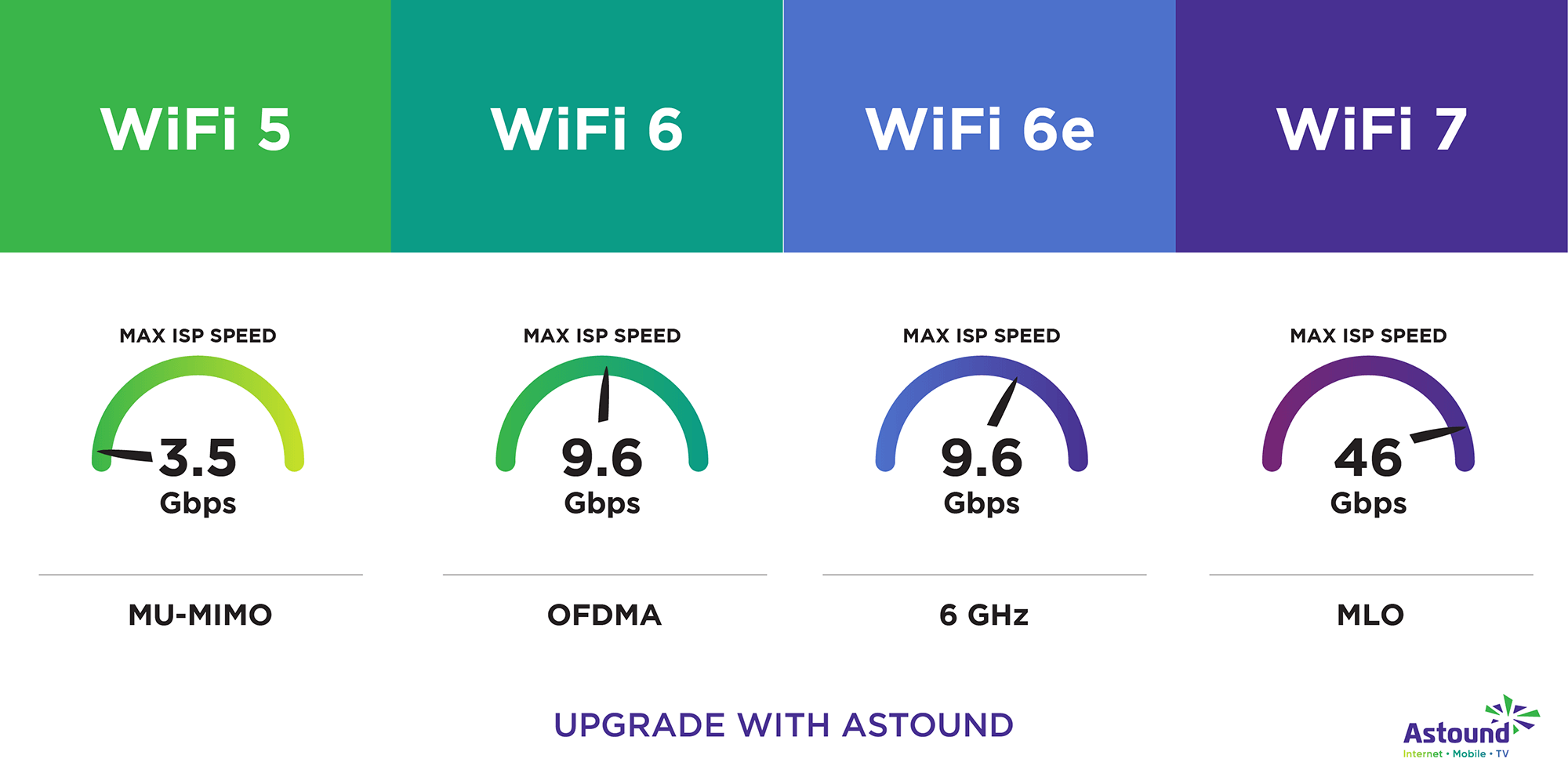
WiFi 7: more than just a speed boost
WiFi 7, also known as 802.11be, is the latest generation of WiFi technology. It’s designed to address the limitations of previous standards, offering significant improvements in speed, latency, and capacity. One of the key advancements is the introduction of 320 MHz channels, which double the bandwidth available compared to WiFi 6/6E. This means faster data transfer rates and the ability to handle more devices simultaneously.
Another crucial feature of WiFi 7 is 4096-QAM (Quadrature Amplitude Modulation). This increases the amount of data that can be transmitted in each signal, further boosting speeds. Perhaps the most significant innovation is Multi-Link Operation (MLO), which allows devices to connect to multiple frequency bands simultaneously. This not only increases bandwidth but also improves reliability by providing redundancy – if one band experiences interference, the connection can seamlessly switch to another.
In a busy office, this means a 500MB design file won't choke the queue for everyone else. But WiFi 7 isn't a magic fix; if your router is tucked in a metal cabinet or your office is flooded with interference from neighboring suites, the 320 MHz channels won't reach their potential.
The case for cellular printing
5G offers a fundamentally different approach to wireless printing. Instead of relying on a local WiFi network, a 5G-enabled printer connects directly to the cellular network, just like a smartphone. This bypasses the limitations of WiFi, potentially offering greater range, dedicated bandwidth, and improved security. Think of it as having a private, always-on connection for your printer.
The benefits of this approach are compelling, particularly for businesses with limited WiFi infrastructure or those that require printing in remote locations. A 5G connection can provide consistent performance even in areas with poor WiFi coverage. Furthermore, the dedicated bandwidth of a 5G connection can ensure that print jobs are prioritized, minimizing delays. Security is also enhanced, as cellular networks employ robust encryption and authentication protocols.
The catch is the monthly bill. Instead of a one-time router upgrade, you're paying for a data plan for every printer. For a high-volume office, those gigabytes add up fast. I see 5G as a solution for pop-up offices or warehouses where running Ethernet or mesh WiFi is a nightmare, not as a total replacement for the local network.
Security trade-offs
Security is a critical consideration for any wireless printing solution. WiFi 7 incorporates WPA3 encryption, the latest and most secure WiFi security protocol. WPA3 offers improved protection against brute-force attacks and provides stronger authentication mechanisms. It’s a significant step up from WPA2, which has known vulnerabilities.
5G, on the other hand, leverages the inherent security of cellular networks. These networks are designed with robust security features, including encryption, authentication, and access control. The cellular infrastructure is generally well-protected and subject to strict security standards. However, cellular networks aren't immune to attacks, and vulnerabilities can emerge. It's also crucial to consider the security of the printer itself.
I'm not sure which is definitively 'more' secure, but each has its strengths and weaknesses. WiFi 7’s security relies on the implementation of WPA3 and the security of your local network. 5G’s security relies on the cellular infrastructure and the security of the printer’s connection to that network. Regardless of which technology you choose, it’s essential to ensure that your printer has the latest firmware updates to address any known vulnerabilities. A compromised printer can be a gateway to your entire network.
- WiFi 7 uses WPA3 encryption and depends entirely on how well you secure your local router.
- 5G uses cellular-grade encryption, which is generally harder to spoof but keeps your data on a carrier's network.
- Common Requirement: Regular firmware updates for both technologies
Security Comparison: 5G vs. WiFi 7 for Office Printers (Projected 2026)
| Security Factor | 5G Connectivity | WiFi 7 Connectivity |
|---|---|---|
| Encryption Protocols | Utilizes cellular network encryption; dependent on carrier implementation (potentially including end-to-end encryption). | WPA3 is standard, offering robust encryption. Potential for future enhancements and protocol updates. |
| Vulnerability History | Relatively new application of 5G technology to printers; long-term vulnerability profile still developing. Cellular networks have known vulnerabilities, though constantly addressed. | WiFi has a longer history, with well-documented vulnerabilities (like KRACK) that are actively mitigated through updates and new standards like WPA3. |
| Authentication Methods | Relies on cellular carrier authentication; SIM card security is crucial. May support multi-factor authentication depending on carrier offerings. | Supports modern authentication methods including WPA3-Enterprise and potentially enhanced Open Authentication options. Can integrate with existing network authentication systems. |
| Data Privacy | Data transmission relies on the cellular carrier's privacy policies. Potential for data interception exists, though cellular networks employ security measures. | Data privacy dependent on network configuration and security practices. Vulnerable to interception if not properly secured, but offers more direct control over data handling within the office network. |
| Ease of Security Management | Security management largely outsourced to the cellular carrier. Limited direct control for the office IT department. | Offers greater control over security configuration and management. Requires dedicated IT expertise to maintain optimal security. |
| Network Segmentation | Inherently segmented due to reliance on a separate cellular network. | Requires deliberate network segmentation implementation to isolate printer traffic from other sensitive data. |
| Firmware Updates | Firmware updates managed by the printer manufacturer and potentially the cellular carrier, potentially introducing delays. | Firmware updates are generally managed by the printer manufacturer, allowing for more responsive security patching. |
Illustrative comparison based on the article research brief. Verify current pricing, limits, and product details in the official docs before relying on it.
The hidden costs of going wireless
The cost of implementing either 5G or WiFi 7 extends beyond the price of the printer itself. WiFi 7 requires upgrading your router and potentially access points to support the new standard. High-performance WiFi 7 routers can be expensive, and you may need to invest in additional access points to ensure adequate coverage throughout your office.
5G introduces a different set of costs. You’ll need a data plan for each printer, or a shared plan with sufficient data to accommodate all your printing needs. Data costs can quickly add up, especially for high-volume printing. You'll also need to factor in the cost of a 5G-compatible printer, which are likely to be more expensive than comparable WiFi models.
I suspect 5G will be more expensive for many small businesses, especially those with moderate printing needs. The ongoing data costs can outweigh the benefits of increased range and reliability. It’s essential to carefully calculate the total cost of ownership for each technology, including hardware, software, data plans, and IT support. Don’t forget to factor in the cost of IT support for managing each system, as 5G connections may require specialized expertise.
Available 5G & WiFi 7 Printers (2026)
The market for 5G and WiFi 7 printers is still emerging, but several manufacturers have announced plans to release compatible models in the coming years. As of late 2024, options are limited, but 2026 should see a significant increase in availability. Here’s a look at some of the printers to watch:
HP OfficeJet Pro 9025e 5G (Expected 2026): A color inkjet printer with support for 5G connectivity, designed for small businesses. Print speed: Up to 30 ppm (black), 24 ppm (color). Features: Duplex printing, scanning, copying, wireless direct. Price: Estimated $350.
Canon MAXIFY GX7020 WiFi 7 (Expected 2026): A high-volume inkjet printer with WiFi 7 support, ideal for busy offices. Print speed: Up to 30 ppm (black), 24 ppm (color). Features: Low-cost ink bottles, duplex printing, scanning, copying, wireless direct. Price: Estimated $400.
Epson EcoTank ET-5880 WiFi 7 (Expected 2026): A wide-format inkjet printer with WiFi 7 connectivity, suitable for printing large documents and graphics. Print speed: Up to 28 ppm (black), 22 ppm (color). Features: Supertank system, duplex printing, scanning, copying, wireless direct. Price: Estimated $500.
Brother MFC-J5945DW WiFi 7 (Expected 2026): A business-class inkjet printer with WiFi 7 support, offering advanced features and high performance. Print speed: Up to 30 ppm (black), 26 ppm (color). Features: Duplex printing, scanning, copying, fax, wireless direct. Price: Estimated $450.
Lexmark CS725de WiFi 7 (Expected 2026): A color laser printer with WiFi 7 connectivity, designed for demanding office environments. Print speed: Up to 40 ppm. Features: Duplex printing, scanning, copying, wireless direct. Price: Estimated $700.
Ricoh IMC7200 WiFi 7 (Expected 2026): A high-performance color laser printer with WiFi 7 support, offering advanced security features. Print speed: Up to 50 ppm. Features: Duplex printing, scanning, copying, wireless direct. Price: Estimated $900.
Zebra ZD621R 5G (Available Now): While primarily a label printer, Zebra offers a 5G enabled model that demonstrates the capability of cellular printing. Print Speed: Up to 6 inches per second. Features: Direct Thermal Printing, 5G connectivity. Price: $800.
Featured Products

All-in-One functionality: Print, scan, copy · Automatic Document Feeder (ADF) and duplex printing · AI-enabled features for enhanced performance
This AI-enabled all-in-one inkjet offers robust features for home offices, including automatic document handling and duplex printing.

Monochrome laser printing · Duplex printing for automatic double-sided output · Wireless connectivity for easy office integration
A reliable monochrome laser printer with duplex printing, ideal for offices prioritizing efficient black and white document production.

Compact monochrome multi-function laser printer · Copy and scan capabilities · Duplex printing for automatic double-sided output
This compact Brother laser printer combines monochrome printing, copying, and scanning with duplex and mobile capabilities, suitable for busy office environments.

All-in-One functionality: Print, scan, copy · Color inkjet printing · 3-month Instant Ink trial included
A budget-friendly color inkjet printer for home use, offering essential print, scan, and copy functions with a convenient Instant Ink trial.

WiFi 7 (802.11be) tri-band router · BE18000 total speed · Multi-Gigabit Ethernet ports
This WiFi 7 router provides cutting-edge connectivity with high speeds, multi-gigabit ports, and advanced features like VPN support and enhanced security for future-proofed office networks.
As an Amazon Associate I earn from qualifying purchases. Prices may vary.
Standout Printers: A Closer Look
From the list above, the Lexmark CS725de WiFi 7 and the Zebra ZD621R 5G stand out as particularly compelling options. The Lexmark offers the speed and reliability of a color laser printer combined with the latest WiFi 7 technology, making it a solid choice for businesses that need high-quality, fast printing. Its robust feature set and security features are also noteworthy.
The Zebra ZD621R 5G, while a niche product, is a testament to the viability of 5G printing. It’s ideal for businesses that require printing in remote locations or where WiFi connectivity is unreliable. Although it’s a label printer, it demonstrates the potential of 5G for a wide range of printing applications. The initial cost is higher, but the benefits of always-on connectivity can be significant.
The Lexmark CS725de is expected to be a workhorse for general office printing, while the Zebra ZD621R excels in specialized scenarios. Both printers represent the cutting edge of wireless printing technology and offer compelling advantages over traditional WiFi-only solutions. User feedback on these models is still limited, but early reviews suggest they deliver on their promises.


No comments yet. Be the first to share your thoughts!